
AI shopping assistance
Help shoppers discover products, compare options, and choose available variants.
Explore AI shopping Dejor: AI Chatbot & WhatsApp by DeepSoll
One of the best Shopify AI chatbot apps for product help and cart building — plus a Shopify WhatsApp app for order notifications, cart recovery, and photo product reviews.
Free plan · 7-day trial · Verified Meta Tech Provider
Dejor is a Shopify AI shopping assistant that brings product help, cart building, customer support, WhatsApp automation, and photo product reviews together in one Shopify app. Developed by DeepSoll, a verified Meta Tech Provider, it sends WhatsApp messages through Meta’s official WhatsApp Business Platform.
A Shopify AI shopping assistant is an on-store chatbot that uses your catalog to answer product questions, compare options, help shoppers pick variants, and add items to the cart. Dejor is a Shopify AI shopping assistant that also supports human handoff when a person needs to take over.
Explore Shopify AI shopping assistanceDiscover products. Choose an option. Build a cart. Get support. Receive updates. Share a review.
Turn product questions into useful answers. Help shoppers compare options, choose variants, and get to their cart.
Explore ai shopping & supportKeep customers informed after checkout with order notifications, customer updates, and broadcasts.
Explore whatsapp automationGive customer feedback a place on your storefront. Collect, display, and manage reviews alongside your support work.
Explore product reviewsFrom the first product question to post-purchase communication.
Help shoppers discover products, compare options, and choose available variants.
Explore AI shopping
Follow up on abandoned checkouts with a useful reminder and a path back to the purchase.
Explore cart recovery
Keep customer conversations and linked orders together, with AI assistance and human handoff.
Explore customer support
Give shoppers more context with customer photos, written reviews, and star ratings.
Explore product reviews
Review conversations to understand recurring questions and the products shoppers ask about.
Prepare your catalog for shopper questions
Install Dejor, configure your AI agent, and connect WhatsApp when you’re ready to add automation.
See the setup stepsLet customers describe what they need in their own words. Dejor uses your store catalog to help them discover relevant products and understand their options.

Help shoppers browse your Shopify products, compare their options, and choose available variants. Keep product questions and cart assistance in the conversation, with a clear path to your Shopify checkout.

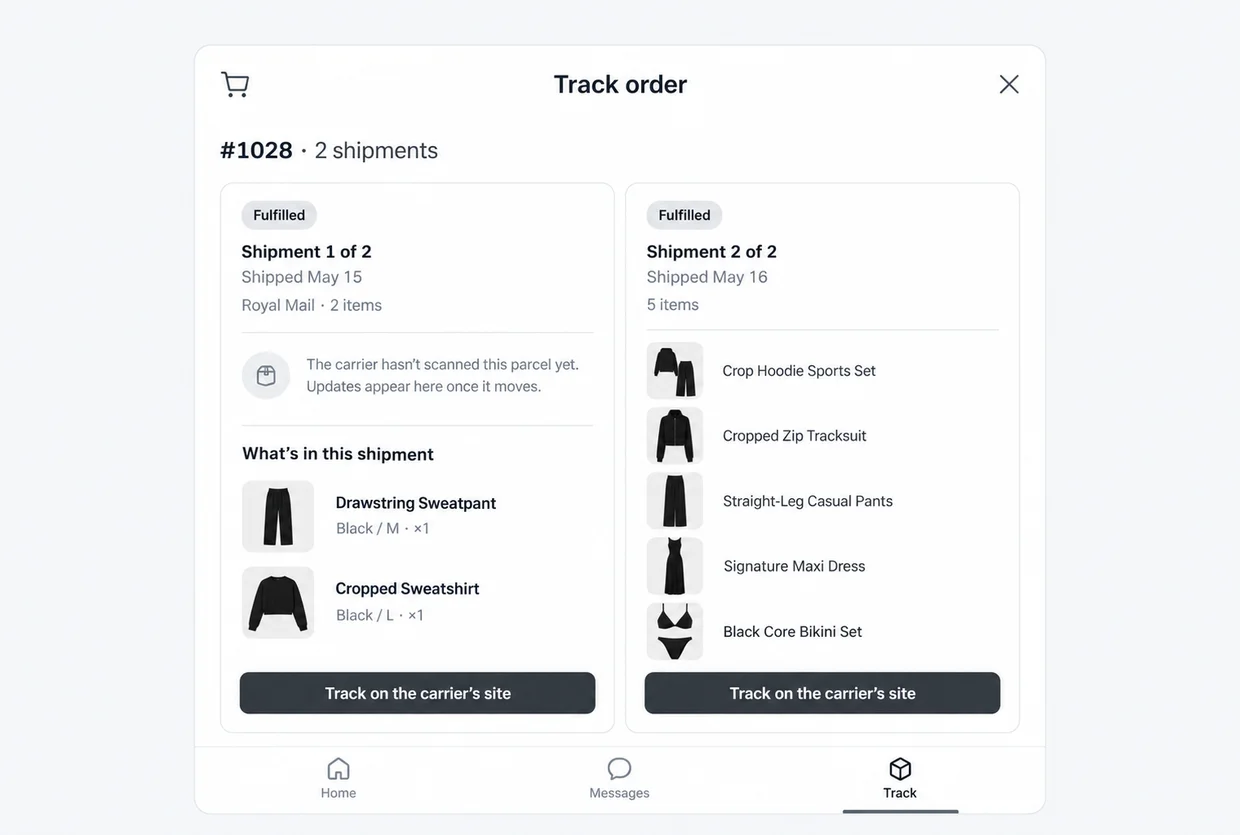
Customers can find their parcel with a tracking number and the email or phone number used at checkout. Show each shipment’s fulfillment status, shipping date, and items, with a link to track it on the carrier’s site. The AI agent also answers product and policy questions, with human handoff when needed.
Read WhatsApp conversations alongside linked Shopify orders. See purchased items, order totals, fulfillment status, and confirmations from WhatsApp without losing the conversation.
Find a conversation, pause the AI when your team needs to step in, mark a thread resolved, or open the linked order in Shopify admin for the next action.
Your catalog and available variants inform shopping assistance. Store policies support customer answers. Order help depends on the information and permissions available to the app.
Explore the demo storeWhatsApp Business API for Shopify lets stores send order messages from their own WhatsApp Business account through Meta’s official API. Dejor connects as a verified Meta Tech Provider so you can send WhatsApp order notifications, shipping updates, abandoned cart recovery, and broadcasts without unofficial gateways.


Get WhatsApp Business API access through Meta’s signup, right inside Dejor. Register your number to your own WhatsApp Business Account (WABA), and keep using the WhatsApp Business app on the same number with coexistence. Manage your business profile, check connection status and quality rating, and create QR codes for customers to reach you.
Account setup · Coexistence · QR codesWhatsApp for ShopifyAutomate order notifications and abandoned cart recovery from real Shopify events. Prepare broadcasts for new arrivals, restocks, or promotions using text and image templates, send them to customers who opted in, and submit every message template to Meta for review before use.
Order notifications · Cart recovery · BroadcastsWhatsApp automation for ShopifyGive your whole team one WhatsApp inbox, with AI assistance built in. Read conversation history alongside linked Shopify orders, so Shopify works as your WhatsApp CRM. Pause AI when a person needs to take over, and resolve the thread when you’re done.
AI assistance · Linked orders · Human handoffAI customer support for ShopifyMost WhatsApp bans are not bad luck. They come from how the message was sent. Dejor sends on the Meta WhatsApp Business API, the way Meta requires, from the account and number you own.
How the official WhatsApp Business API worksWhy WhatsApp numbers get bannedStaying inside Meta’s rules is what keeps a number safe. Dejor is built so you do that by default.
Shopify WhatsApp order notifications confirm a purchase and share shipping updates in WhatsApp. Cart recovery messages remind shoppers who left items behind and bring them back to checkout. Dejor runs both from real Shopify events on the WhatsApp Business API.
Send an order confirmation with purchase details so customers know what they’ve ordered.
Send courier and tracking details from the Shopify fulfillment so customers can follow their delivery.
Send a delivery update and keep the customer informed through the final step of their order.
Catch address issues. Ask customers to confirm shipping details flagged by Shopify.
Choose what gets sent. Turn updates on or off and see which templates are live or awaiting review.
Give shoppers the detail they need to choose with confidence. Make ratings, customer photos, and written reviews part of the product experience.
Star ratings and rating breakdowns help shoppers get a quick read on customer feedback.
Customer photos and written reviews add context from people who have tried the product.
Filters, sorting, and helpful votes make it easier to explore relevant reviews.
Bring shopping, messaging, and feedback together in Dejor.
Explore Dejor on ShopifyHelp shoppers ask for what they need and weigh the relevant options.
Explore AI shopping assistanceConnect order communication to WhatsApp and make updates easier to manage.
Explore WhatsApp automationUse conversations and reviews to understand what customers need next.
Explore product reviewsPractical guides for product discovery, customer support and evaluating the right app for your store.
See Shopify examples and how shoppers move from questions to product choices.
Prepare catalog information for useful conversational product discovery.
Connect product questions, comparisons and cart assistance in one shopping journey.
Understand the different tasks and where your team should take over.
Compare published capabilities, support workflows and plan billing units.
Review answer accuracy, cart journeys, handoff and sales signals.
Start free. Add capacity when your conversations grow.
$0/month
Start with the essentials.
Start free$9/month
or $90/year and save 17%
7-day free trial on paid plans.
Choose Starter$29/month
or $290/year and save 17%
7-day free trial on paid plans.
Choose Plus$69/month
or $690/year and save 17%
7-day free trial on paid plans.
Choose ScaleAll prices in USD. Usage allowances are monthly on either billing period. Select and confirm your plan through Shopify.
| Capability | Free | Starter | Plus | Scale |
|---|---|---|---|---|
| AI replies / month | 300 | 2,000 | 5,000 | 15,000 |
| WhatsApp order notifications / month | 50 | Unlimited | Unlimited | Unlimited |
| Broadcast messages / month | Not included | 10,000 | 50,000 | Unlimited |
| Conversation history | 7 days | 30 days | 90 days | 180 days |
| Product discovery & comparisons | Included | Included | Included | Included |
| Variant, cart & checkout assistance | Included | Included | Included | Included |
| Policy answers & available order status | Included | Included | Included | Included |
| Human handoff & conversation context | Included | Included | Included | Included |
| Review display & export | Included | Included | Included | Included |
| Bulk review import | Not included | Included | Included | Included |
| Unlimited support | Not included | Not included | Included | Included |
Dejor is a Shopify AI shopping assistant and WhatsApp app that also displays photo product reviews. It helps shoppers find products, sends WhatsApp order updates and cart recovery messages, and shows star ratings with customer photos.
Dejor focuses on AI shopping assistance (recommendations, comparisons, variants, cart) plus WhatsApp Business API messaging and on-site photo reviews in one install. It has a free plan and paid plans from $9/month. Choose it if you want shopping chat, WhatsApp, and reviews together rather than three separate apps.
An AI shopping assistant helps shoppers discover products, compare options, and build a cart. A support chatbot mainly answers policies, order status, and tickets. Dejor does shopping assistance first, with support answers and human handoff when needed.
Yes. It uses your store catalog to help shoppers discover products, compare options, and select available variants.
The agent supports variant selection and cart assistance, then guides shoppers toward your store’s checkout.
It can use available store information, policies, and conversation context. Order-status assistance depends on the order information and access available to the app.
Yes. Dejor connects to the WhatsApp Business API for order notifications, shipping updates, abandoned cart recovery, and broadcasts, using your own WhatsApp Business account. Broadcast allowances depend on your plan.
You apply inside Dejor. Meta’s signup walks you through it: you log in with Facebook, register your business and phone number, and Meta creates your WhatsApp Business Account (WABA). There is no API key or access token to copy, and Dejor sets up the webhook for you.
Yes. Dejor supports WhatsApp Business API coexistence. You connect the number you already use in the WhatsApp Business app, keep replying from your phone, and Dejor sends your order messages through the API from that same number.
Meta bills you directly for WhatsApp Business API fees, through your own Meta business account. Dejor does not bill you for messages. Meta charges for each template message it delivers, and the price depends on the message type and the customer’s country. Replies to a customer who messaged you in the last 24 hours are free, and so are order updates sent inside that window. Dejor’s own plan is separate, and there is a free plan. Meta’s WhatsApp pricing page lists the current rates.
No. Those companies are Business Solution Providers (BSPs) that sell their own access to the API. DeepSoll is a verified Meta Tech Provider, the partner type where your business pays Meta directly. Dejor runs on Meta’s Cloud API, so there is no WhatsApp Business API client to host and no reseller in the middle.
Dejor sends through Meta’s official WhatsApp Business API, so you are not taking the risk that comes with WhatsApp Web automation or an unofficial gateway. Meta can still restrict any account that breaks its rules, and messaging people who did not opt in is the usual cause. Dejor shows your quality rating and sends only the templates Meta approved, so you can see and avoid the problems that lead to a restriction.
DeepSoll, the company behind Dejor, has completed Meta’s Tech Provider access verification. Dejor is built on the official WhatsApp Business API solution from Meta. It does not automate WhatsApp Web or a phone.
Those tools drive a logged-in session, which breaks Meta’s terms and is the most common reason a business number gets banned. Dejor uses the official Cloud API with your own WhatsApp Business account, approved templates, and a visible quality rating.
Yes. The WhatsApp Business account and the number are yours. Dejor connects to the account you own rather than reselling you someone else’s number.
For many Shopify stores, no. Each WhatsApp chat sits next to the customer’s Shopify orders, so your team sees what they bought before replying. If you already run a full CRM like Zoho for sales outside Shopify, keep it. Dejor does not sync with other CRMs.
No. Dejor sends one-to-one WhatsApp messages: order updates, broadcasts to customers who opted in, and chat replies. It does not place WhatsApp calls or post in WhatsApp groups.
DeepSoll’s team helps with setup, templates and sending inside Dejor. Meta decides account restrictions, business verification and billing, and we help you find the right place in WhatsApp Manager to act on them.
Yes. Dejor collects and displays photo product reviews with star ratings on product pages. All plans include review display and export; paid plans also include bulk import. For heavy review SEO/syndication, many stores still use Judge.me alongside Dejor.
Yes. The free plan includes 300 AI replies and 50 WhatsApp notifications per month. Paid plans start at $9 a month and offer a 7-day trial.
No. Use it for recurring questions and shopping assistance. Human handoff and conversation context help your team continue where personal attention is needed.
Dejor is new, and we have not collected reviews for it yet. Rather than borrow a score from somewhere else, we would rather publish the first one from a merchant actually running it. If that is you, tell us how it went and we will add it here with your name on it.
Compare Dejor with Shopify AI shopping agents, WhatsApp notification apps, and product review tools before you add another subscription.
Install Dejor on Shopify and explore the free plan with your store.