How do I set up automated chat for my Shopify storefront?
To add Dejor’s AI chatbot to a Shopify website, install the app, review the assistant’s store content and appearance, then enable its storefront widget through the theme editor. Save the theme and test the chat on your storefront. Installing an app and enabling its theme embed are separate steps. The Dejor home screen groups onboarding into “Configure your assistant” and “Enable the storefront widget,” so you can see what remains to be done.
1. Install Dejor from the Shopify App Store
Open the Dejor: AI Chatbot & WhatsApp listing using the installation link below. Select Install, choose the intended Shopify store and review the access Shopify requests before confirming installation. Open Dejor from your Shopify admin once it is installed. Review the current plan and usage allowances in the app or listing; pricing and limits can change. You do not need to build a custom chatbot or paste a separate widget script to follow this app-based setup.
2. Configure your AI shopping assistant
On Dejor’s Home page, find “Get your assistant ready.” Under “Configure your assistant,” select “Set up assistant.” Review the store content, welcome message and widget appearance, as shown in the supplied admin screenshot. Check that product descriptions, variants, policies and FAQs contain the information shoppers need. Use a welcome message that invites a useful question, such as asking what the visitor is shopping for. Save the settings you change before continuing.
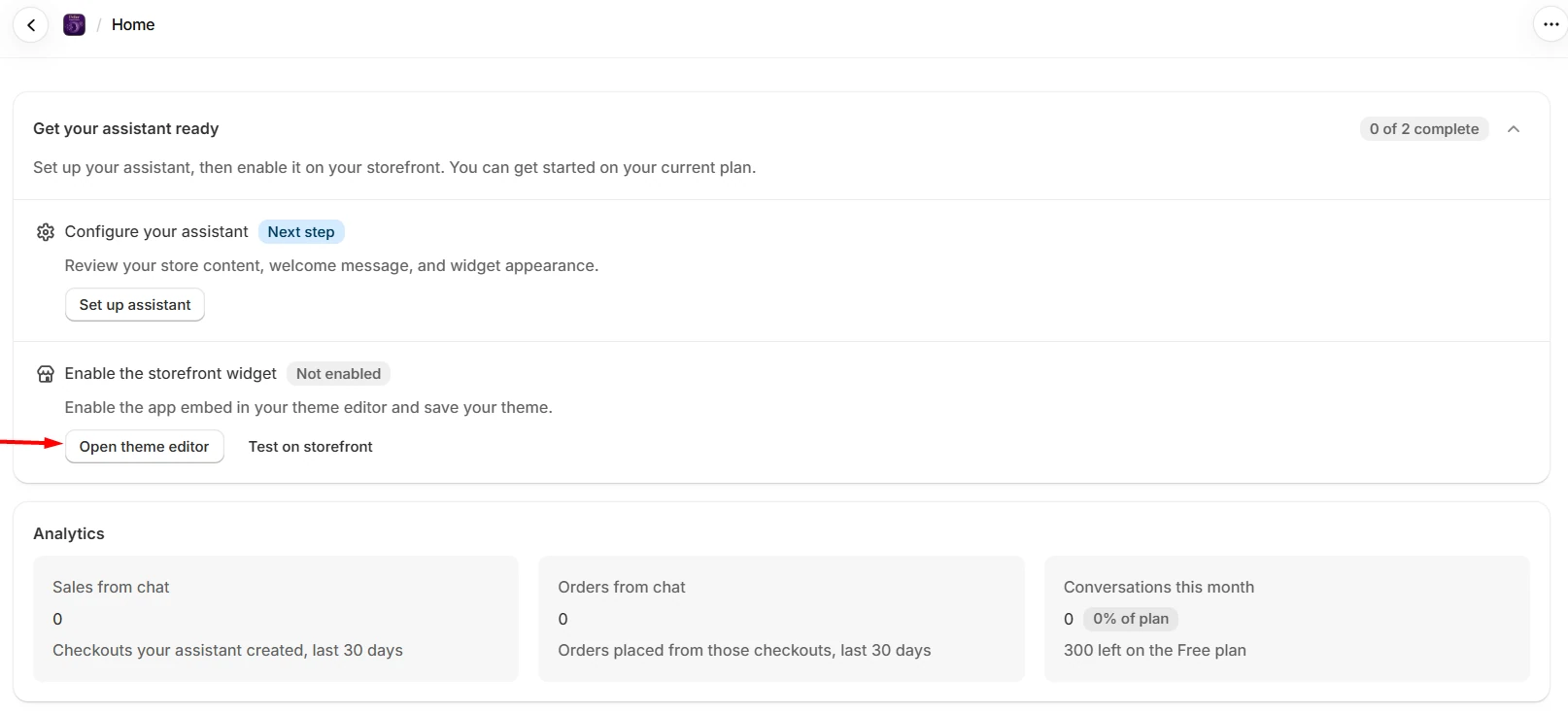
3. Enable the storefront widget and save your theme
In the second onboarding task, select “Open theme editor.” In Shopify’s theme editor, open App embeds, enable the Dejor embed and select Save. Confirm that you are editing the theme your customers use; enabling an embed in a draft theme does not make it visible on the published storefront. Shopify documents app embeds as the mechanism for floating elements such as chat widgets. Return to Dejor after saving and use “Test on storefront.”
4. Test a complete shopping conversation
Open the storefront on desktop and mobile. Check that the launcher is visible and does not cover important navigation or checkout controls. Ask for a product recommendation, compare two products and select an available variant. Try adding the selection to the cart, then verify that the item and variant are correct. Ask a policy question and check the answer against the published policy. Test human handoff and confirm your team can read the previous conversation. Use real catalog examples rather than only a greeting.
If the chatbot does not appear
First check whether the embed is enabled and saved in the published theme. Reload the storefront and confirm you are viewing the same store and theme. Reopen Dejor’s onboarding to check the widget status. If the launcher still does not appear, review the theme’s app-embed support and contact Dejor support with the affected URL, device and steps to reproduce the problem. If the widget appears but gives weak answers, review the underlying catalog and policies before assuming the theme integration is broken.
Launch checklist and ongoing review
Before launch, confirm the published-theme embed is saved, the welcome message is appropriate, product recommendations use the right catalog, cart actions select the right variant and your team can receive handoffs. After launch, review recurring questions and unresolved conversations. The Dejor dashboard shown here includes sales from chat, orders from chat and conversations this month. Use those signals to improve store content and evaluate the experience; do not assume a widget alone guarantees better sales.
Common installation questions
Do I need to code an integration? This guide uses the Dejor app and Shopify theme embed, rather than a custom integration. Is installation enough to make chat visible? Enable the storefront embed and save the intended theme as well. What happens if I change themes? Check and test the Dejor embed in the new theme before publishing it. Where can I learn how visitors use it? Read the shopping-assistance guide linked below.
Sources: Dejor on the Shopify App Store · Shopify’s app embed instructions.
Explore this workflow in Dejor.
See how ai chatbot for shopify fits into your store, including setup steps and common questions.